
Use Financials > Reports to see your organization's Trial Balance, Balance Sheet, and Income Statement. Both Owners and Org Admins can open these reports. They are view-only, so nothing you do here changes your books, and each report updates as soon as you change the date.
The Three Reports
- Trial Balance — every account with its debit/credit balance, grouped by type (e.g. Assets, Income), as of a chosen date. Useful as a raw sanity check that everything is balanced. See What Is the Trial Balance Report?
- Balance Sheet (labeled "GAAP Balance Sheet") — a snapshot of what the organization owns (Assets) versus owes (Liabilities), plus Equity, as of a given "As of date." Includes an Accounting Identity panel (a bar chart of Assets vs. Liabilities + Equity) and an Equity Ratio under Key Ratios. To see how it differs from the Income Statement, read What's the Difference Between a Balance Sheet and an Income Statement.
- Income Statement (labeled "Profit and Loss Statement") — covers Revenue and Expenses over a Start date / End date range you set, ending in a Net Income total.
Steps
- Go to Financials > Reports.
- Choose the report from the tabs across the top (Trial Balance is selected when the page opens): Trial Balance, Balance Sheet, or Income Statement. A one-line description of the selected report appears under the tabs. Trial Balance: "Every ledger account and its balance as of a date — used to confirm the books' balance." Balance Sheet: "What your organization owns and owes as of a single date." Income Statement: "Income and expenses over a date range. Also called a Profit & Loss (P&L)."
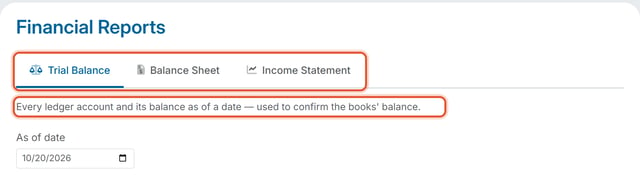
- Set the date field(s) — Balance Sheet and Trial Balance use a single "As of date"; Income Statement uses a Start date and End date to define the period. For the steps, see How Do I Change the Date on the Balance Sheet? and How Do I Set a Date Range on the Income Statement?