
When would you use this?
- Confirming exactly who currently lives at or owns a specific unit before sending a maintenance notice.
- Checking whether a property has any unpaid invoices before approving a resale or ownership transfer.
- Reviewing the history of who was added or removed from a property, and when.
Opening it
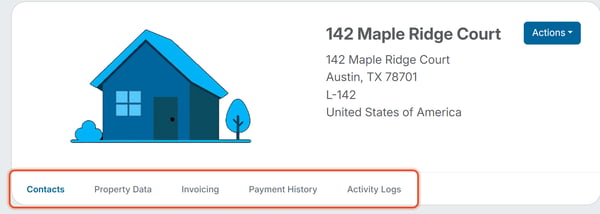
From the Properties list, open a row's Actions dropdown and choose View. This opens the Property Profile — a dedicated page for that one property, separate from the org-wide list. Its header repeats the property's title, full address, lot number (if it has one), and country, with its own Actions button (Edit and Delete are also available from here).
Below the header is a row of five tabs: Contacts, Property Data, Invoicing, Payment History, and Activity Logs.
Contacts tab
Shows the members attached to this property as avatar cards with their name and a role badge (Owner or Tenant). The Attach Members button here is how you connect an existing member to this property (see How Do I Attach an Existing Member to a Property). From a member's own profile, the Properties tab has an Attach Property button that does the same thing from the other direction. A property with nobody attached shows a "No members are associated with this property" empty state instead.
Property Data tab
A simple read-out of the property's core details: Title, Address, Lot Number, and Country — the same information entered on the Add/Edit Property form, displayed for quick reference.
Invoicing tab
An Outstanding Invoices table scoped to this one property, listing Invoice #, Invoice Name, Issued date, Due date, Status, Amount, Late Fees, and a per-row Actions menu. The table shows how many invoices are listed (for example, "Showing: 4 of 4") and the Amount Owed at the top right, and a Pay button shows the total of the invoices you have selected. Voided invoices can also appear in the list.
Payment History tab
A table of payments made against this property’s invoices, with a Sort control and a Resend Receipts button. Columns are Invoice Name, Invoice #, Due Date, Date Paid, Status, Amount, Service Fees, Payment Type, and a per-row Actions menu.
Activity Logs tab
A chronological audit trail of everything that's happened to this property record — for example, the property being created, and each member being added as Owner or Tenant, and each member being removed — each entry showing who made the change (for example, "by Sarah Admin") and a timestamp.