
Every invoice carries a Status that tells you where it stands in the billing lifecycle. The Status list in the Filter panel on the Invoice Dashboard (Balances > Invoice Dashboard > Filter) offers seven values. The dashboard shows only Open, Late, and Pending until you add the others in the Filter panel.
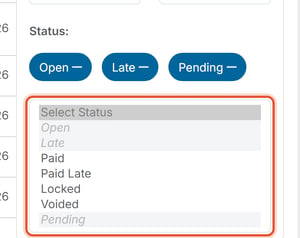
The Seven Statuses
- Open — issued, unpaid, and not yet past its due date. A newly issued invoice starts as Open. When the due date passes without payment, the status changes to Late.
- Paid — paid on or before the due date.
- Paid Late — paid, but after the due date had already passed.
- Voided — canceled and no longer owed. A voided invoice is fully excluded from billing totals (Total Amount Invoiced and the Open/Paid/Late buckets), not just re-labeled.
- Late — past its due date and still unpaid. On the Invoice Dashboard, Late invoices up to 30 days past due count in the Current (0–30 Days) tile and those more than 30 days past due count in the Past Due (>30 Days) tile.
- Locked — the invoice is closed out and can no longer be marked paid or voided. Simply paying an invoice does not automatically make it Locked; this status is tied to closed accounting periods.
- Pending — a payment is in progress, e.g. an ACH bank transfer that hasn't cleared yet. If a Pending ACH payment is canceled, the invoice returns to Open, or to Late if it is past its due date; see How Do I Cancel a Pending ACH Payment?
To change an invoice's status, see How Do I Mark or Unmark an Invoice as Paid and Void an Invoice.