
The Limit
Each individual file uploaded to Document Center can be up to 250 MB. This limit applies per file, not per folder or per upload batch — you can upload several files at once as long as each one is under 250 MB.
Example: A high-resolution scan of a full set of governing documents, a large batch of community event photos, or a lengthy meeting-minutes PDF with embedded images can all comfortably fit under 250 MB. A raw, uncompressed video walkthrough of a property is one of the few document types likely to exceed it.
What Happens If a File Is Too Big
If a file exceeds 250 MB, the upload is rejected with a size warning instead of being uploaded. Split the file into smaller pieces or compress it (for example, reducing PDF image resolution, or zipping a batch of photos into a smaller-format file) before trying again.
File Type Restrictions
Document Center does not restrict uploads by file extension — image, PDF, document, and other common file types all upload the same way. The only enforced limit found is the 250 MB per-file size cap described above; there is no separate "allowed file types" list to check against before uploading.
Where the Size Limit Is Shown
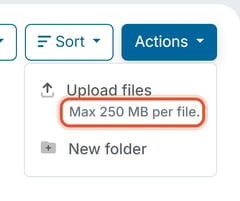
The 250 MB per-file limit is listed directly in the upload menu:
- Open a folder in Document Center.
- Click Actions.
- The Upload files option shows "Max 250 MB per file" underneath it.
Good to Know
- The 250 MB per-file limit is separate from the organization's total Document Center storage cap. See "How Do I Manage Document Center Storage Usage and Trash" for the overall capacity ceiling, which is shared across every folder in the organization.
- There's no way to request a per-file exception to the 250 MB limit from within the platform — oversized files always need to be split or compressed before upload.