
Message Center > Email History logs every email the platform has sent for the organization, and its Type column separates them into two groups: emails you or another admin chose to send (Email Blast) and emails the system sends automatically in response to something happening in the account. This article covers that second group — the automated types — and what triggers each one.
When Would You Use This?
- A member says they got an email and you want to confirm what it was for and why the system sent it, without guessing.
- You're reviewing Email History and want to tell at a glance which entries were something you or another admin sent on purpose versus something the platform sent on its own.
Where to See These
- Go to Message Center > Email History.
- Look at the Type column for each row, or use the Email Type filter to show only one kind at a time (see Filter Email History by Type or Status).
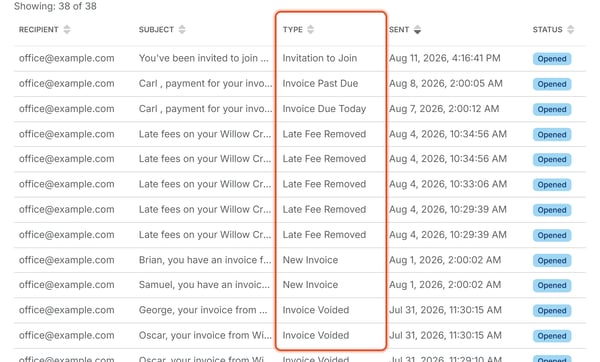
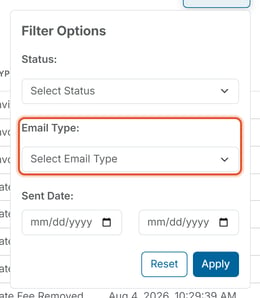
The Automated Types
Invoicing
- New Invoice — sent when a new invoice is issued to a member, whether created manually or generated automatically by an Invoice Schedule. Subject example: "[Member], you have an invoice from [Organization Name]."
- Invoice Due Today — sent on the day an open invoice's due date arrives, while it's still unpaid. Subject example: "[Member], payment for your invoice from [Organization Name] is due today."
- Invoice Due Tomorrow — sent one day before an open invoice's due date, as an advance reminder.
- Invoice Past Due — sent after an invoice's due date has passed without payment. Subject example: "[Member], payment for your invoice from [Organization Name] is late."
- Invoice Marked Paid — sent when an invoice is marked as paid.
- Invoice No Longer Marked Paid — sent when an invoice that had been marked paid is reverted back to unpaid.
- Invoice Voided — sent when an invoice is voided. Subject example: "[Member], your invoice from [Organization Name] has been voided."
Late Fees
- Late Fee Added — sent when a late fee is applied to an unpaid invoice. Subject example: "Your payment to [Organization Name] for '[Invoice Name]' is subject to a late fee."
- Late Fee Removed — sent when a late fee that had been applied is taken back off. Subject example: "Late fees on your [Organization Name] invoice for '[Invoice Name]' have been waived."
Payments
- Payment Processing / Payment Processing (Multiple Invoices) — sent when a payment has been submitted and is being processed, for one invoice or several at once.
- Payment Received / Payment Received (Multiple Invoices) — sent once a payment has been confirmed, for one invoice or several at once.
- Payment Canceled / Payment Canceled (Multiple Invoices) — the notice for a canceled payment, for one invoice or several at once. See How Do I Cancel a Pending ACH Payment?
- Payment Failed / Payment Failed (Multiple Invoices) — sent to the member when their payment attempt fails, for one invoice or several at once.
- Payment Failed (Org Notice) / Payment Failed (Org Notice, Multiple Invoices) — the organization-facing counterpart to a failed payment, sent in addition to the member-facing notice.
Refunds
- Refund Issued — sent to the member when a refund is issued.
- Refund Issued (Org Notice) — the organization-facing counterpart sent alongside Refund Issued.
- Refund Failed (Org Notice) — sent to the organization when a refund attempt fails.
Account and Access
- Invitation to Join — sent when a member is invited to create a login for the organization. Subject: "You've been invited to join [Organization Name]."
- Password Reset — sent when a password reset is requested for a login.
- Staff Account Setup — sent when a new staff account is set up.
Support
- Support Request — sent in connection with a support request submitted through the platform.
Good to Know
- These emails go out on their own — no one has to click "send" for any of them. Invoice Due Today and Invoice Past Due, in particular, go out at a fixed early-morning time (around 2:00 AM in the account's timezone) rather than the instant the due date technically arrives, since they run on a scheduled daily check rather than a live trigger.
- Every automated email still shows a Status (Delivered, Opened, etc.) the same way manual Email Blast sends do.
- To see whether one of these emails reached the member, check its Status (see Understand Email Status Values).
Note: Automated emails cannot be turned off individually from Email History — they're a byproduct of the action that triggered them (inviting a member, an invoice becoming due, a late fee being added or removed, etc.), not a separate setting to configure.