---
title: View the Payment Dashboard
description: Payment history
---
[Skip to content](https://help.hoastart.app/view-payment-history#main-content)

Open main navigation
Close main navigation
How can we help you?
- There are no suggestions because the search field is empty.
1. [HOA Start - Empower](https://help.hoastart.app/?hsLang=en)
2. [Payments](https://help.hoastart.app/payments?hsLang=en)
# View the Payment Dashboard
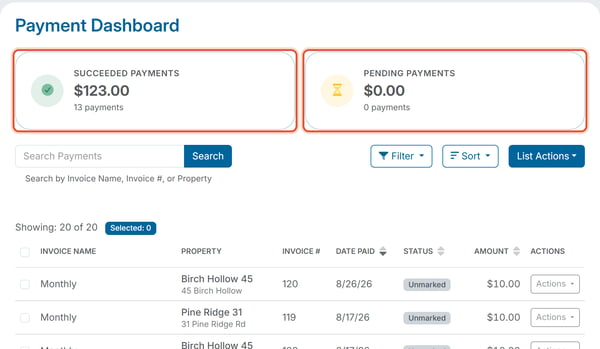
Balances \> Payment Dashboard lists every payment recorded against an organization's invoices — both online payments processed through a connected payment processor and payments that you or another administrator mark as paid manually (for example, a check or cash payment entered by hand).
Two summary tiles at the top show Succeeded Payments and Pending Payments, each with a dollar total and a payment count. The Succeeded Payments tile includes payments marked as paid manually. Below is a searchable, sortable table of payments with these columns: Invoice Name, Property, Invoice #, Date Paid, Status, Amount, and an Actions column. On a wider screen the table also shows Due Date, Service Fees, and Payment Type. The table loads 20 payments at a time; scroll down to load the rest. The line above the table, such as "Showing: 20 of 31", tells you how many payments match your search and filters. Click Actions at the end of a row to download or resend a receipt, or to cancel a Pending ACH payment; see [Download a Receipt or Export from the Payment Dashboard](https://help.hoastart.app/download-a-receipt-or-export-payment-history?hsLang=en) and [How Do I Cancel a Pending ACH Payment?](https://help.hoastart.app/how-do-i-cancel-a-pending-ach-payment?hsLang=en).
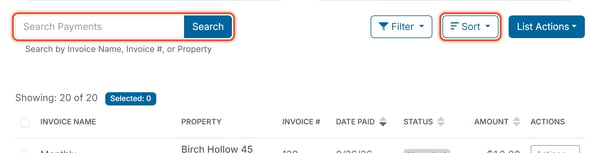
- Search — search the Search Payments box by Invoice Name, Invoice #, or Property.
- Sort — click the Sort button, choose Status, Date Paid, Due Date, Amount, or Fees, then choose Ascending or Descending. You can also click the up/down arrows beside the Date Paid, Status, and Amount column headings.
- [Dashboard & Reporting](https://help.hoastart.app/dashboard-reporting?hsLang=en)
- [Members](https://help.hoastart.app/members?hsLang=en)
- [Properties](https://help.hoastart.app/properties?hsLang=en)
- [Documents](https://help.hoastart.app/documents?hsLang=en)
- [Email & Communication](https://help.hoastart.app/email-communication?hsLang=en)
- [Budgets & Expenses](https://help.hoastart.app/budgets-expenses?hsLang=en)
- [Invoicing & Billing](https://help.hoastart.app/invoicing-billing?hsLang=en)
- [Payments](https://help.hoastart.app/payments?hsLang=en)
- [Bank Reconciliation](https://help.hoastart.app/bank-reconciliation?hsLang=en)
- [Organization Settings](https://help.hoastart.app/organization-settings?hsLang=en)
- [Support](https://help.hoastart.app/support?hsLang=en)
[](https://hoastart.com/)
Copyright © 2026, HOA Start