---
title: View and Edit Budgets
description: view and edit budgets
---
[Skip to content](https://help.hoastart.app/view-and-edit-budgets#main-content)

Open main navigation
Close main navigation
How can we help you?
- There are no suggestions because the search field is empty.
1. [HOA Start - Empower](https://help.hoastart.app/?hsLang=en)
2. [Budgets & Expenses](https://help.hoastart.app/budgets-expenses?hsLang=en)
# View and Edit Budgets
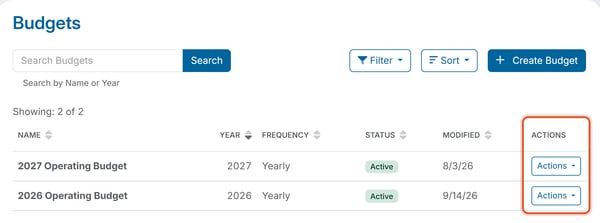
**Financials \> Budgets** lists every budget in a table with these columns: Name, Year, Frequency, Status, Modified date. Each year can have only one budget. To make a new budget, see [Create a Budget](https://help.hoastart.app/create-a-budget?hsLang=en).
##### **Search and filter**
- Type a **Name** or **Year** into the **Search Budgets** box at the top and press Enter to run the search.
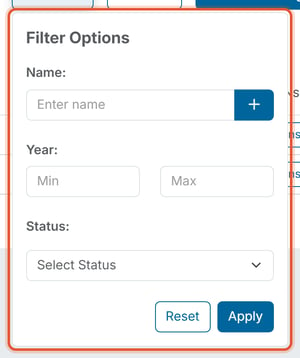
- The Filter panel narrows by **Name**, a **Year** range (Min and Max), and **Status** (Active or Inactive). Click **Apply** to filter the list, or **Reset** to clear the filters.
- Sort opens a menu where you can order the list by Name, Year, Frequency, Status, or Modified, in Ascending or Descending order.
##### **Row actions**
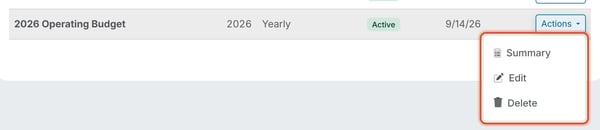
Each row's **Actions** menu offers:
- **Summary** — opens a page that compares the planned and actual amounts for Revenue, Expenses, and Net Income (each shows Actual, Budgeted, and Variance), with a table of every account in the budget. For more, see [How Do I View a Budget's Summary?](https://help.hoastart.app/how-do-i-view-a-budgets-summary?hsLang=en)
- **Edit** — change the amounts or add and remove account rows. The Year cannot be changed. See [How Do I Edit a Budget?](https://help.hoastart.app/how-do-i-edit-a-budget?hsLang=en).
- **Delete** — remove the budget. See [How Do I Delete a Budget?](https://help.hoastart.app/how-do-i-delete-a-budget?hsLang=en).
##### **Related articles**
- [How Do I Edit a Budget?](https://help.hoastart.app/how-do-i-edit-a-budget?hsLang=en)
- [How Do I Delete a Budget?](https://help.hoastart.app/how-do-i-delete-a-budget?hsLang=en)
- [Create a Budget](https://help.hoastart.app/create-a-budget?hsLang=en)
- [Dashboard & Reporting](https://help.hoastart.app/dashboard-reporting?hsLang=en)
- [Members](https://help.hoastart.app/members?hsLang=en)
- [Properties](https://help.hoastart.app/properties?hsLang=en)
- [Documents](https://help.hoastart.app/documents?hsLang=en)
- [Email & Communication](https://help.hoastart.app/email-communication?hsLang=en)
- [Budgets & Expenses](https://help.hoastart.app/budgets-expenses?hsLang=en)
- [Invoicing & Billing](https://help.hoastart.app/invoicing-billing?hsLang=en)
- [Payments](https://help.hoastart.app/payments?hsLang=en)
- [Bank Reconciliation](https://help.hoastart.app/bank-reconciliation?hsLang=en)
- [Organization Settings](https://help.hoastart.app/organization-settings?hsLang=en)
- [Support](https://help.hoastart.app/support?hsLang=en)
[](https://hoastart.com/)
Copyright © 2026, HOA Start