---
title: How Invoice Schedules Generate One Invoice Per Property
description: how invoice schedules generate one
---
[Skip to content](https://help.hoastart.app/how-invoice-schedules-generate-one-invoice-per-property#main-content)

Open main navigation
Close main navigation
How can we help you?
- There are no suggestions because the search field is empty.
1. [HOA Start - Empower](https://help.hoastart.app/?hsLang=en)
2. [Invoicing & Billing](https://help.hoastart.app/invoicing-billing?hsLang=en)
# How Invoice Schedules Generate One Invoice Per Property
An Invoice Schedule is a template, not a single invoice. When you select more than one property under "Select Properties to charge," the system does **not** create one shared invoice split across those properties — it creates a completely separate invoice for each property selected, and each invoice is for the **full Amount** you entered.
##### Example
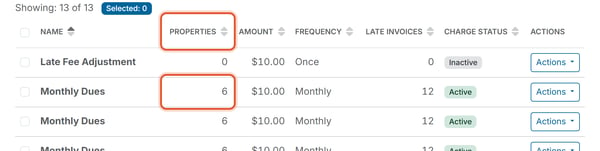
A "Once" schedule for $5.00 with two properties selected generates two invoices — one per property — each billed for $5.00, for a Total Invoiced of $10.00 across the two invoices. It does not generate one $2.50 invoice per property, and it does not generate one combined $10.00 invoice covering both properties. A Monthly schedule for $10.00 with six properties selected issues six invoices of $10.00 each month.
##### What This Means for the Properties Count
The **Properties** count shown on the Invoice Schedules list (for example, "2") tells you how many invoices that schedule will generate each time it issues — not how many properties share one invoice. If you see "Properties: 2" on a schedule row, expect two separate invoices, each for the full Amount.
##### Where to check the results
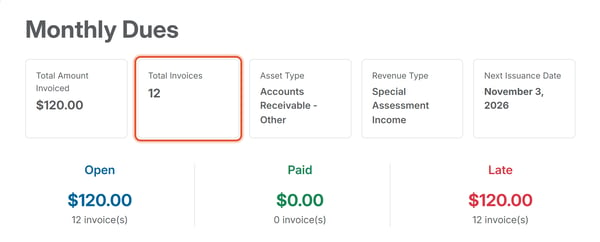
Clicking **Actions \> Summary** on a schedule's row opens an Invoice Schedule Summary page showing Total Amount Invoiced, Total Invoices, and Open / Paid / Late breakdowns for everything that schedule has generated — this is the fastest way to confirm how many invoices a multi-property schedule actually produced. See [How Do I View an Invoice Schedule's Summary?](https://help.hoastart.app/how-do-i-view-an-invoice-schedules-summary?hsLang=en) To set up a schedule, see [Create a One-Time Invoice](https://help.hoastart.app/create-a-one-time-invoice?hsLang=en).
- [Dashboard & Reporting](https://help.hoastart.app/dashboard-reporting?hsLang=en)
- [Members](https://help.hoastart.app/members?hsLang=en)
- [Properties](https://help.hoastart.app/properties?hsLang=en)
- [Documents](https://help.hoastart.app/documents?hsLang=en)
- [Email & Communication](https://help.hoastart.app/email-communication?hsLang=en)
- [Budgets & Expenses](https://help.hoastart.app/budgets-expenses?hsLang=en)
- [Invoicing & Billing](https://help.hoastart.app/invoicing-billing?hsLang=en)
- [Payments](https://help.hoastart.app/payments?hsLang=en)
- [Bank Reconciliation](https://help.hoastart.app/bank-reconciliation?hsLang=en)
- [Organization Settings](https://help.hoastart.app/organization-settings?hsLang=en)
- [Support](https://help.hoastart.app/support?hsLang=en)
[](https://hoastart.com/)
Copyright © 2026, HOA Start