---
title: How Do I Void an Expense?
description: Learn how to void an expense that was recorded by mistake, what happens to your books when you do, and how voided expenses appear in the list.
---
[Skip to content](https://help.hoastart.app/how-do-i-void-an-expense#main-content)

Open main navigation
Close main navigation
How can we help you?
- There are no suggestions because the search field is empty.
1. [HOA Start - Empower](https://help.hoastart.app/?hsLang=en)
2. [Empower Knowledge Center](https://help.hoastart.app/empower-knowledge-center?hsLang=en)
3. [Budgets & Expenses](https://help.hoastart.app/empower-knowledge-center?hsLang=en#budgets-expenses)
# How Do I Void an Expense?
Voiding cancels an expense that was recorded by mistake - a wrong amount, a duplicate, or the wrong account. The expense stays in your Expenses list with the status **Voided**, and its effect on your books is reversed.
##### Steps
1. Go to **Financials \> Expenses** and find the expense. Use **Filter** if the list is long.
2. Click **Actions** on that row, then **Void**.
3. A window asks "Are you sure you want to void this expense?" and includes an optional **Notes** box. Adding a short reason, such as "Duplicate entry. This invoice was already recorded.", helps anyone who reviews the records later.
4. Click **Void**. The message "Expense has been voided successfully." appears - click **OK**.
##### What happens after you void
- The expense stays in the list with a **Voided** badge, so you keep a record of what was entered and cancelled.
- The entry it posted to your books is reversed. For example, voiding a $300.00 pool service expense takes $300.00 back out of the expense account and out of the liability account, so reports such as the Trial Balance return to where they were before it was recorded.
- Edit and Void are greyed out on a voided expense.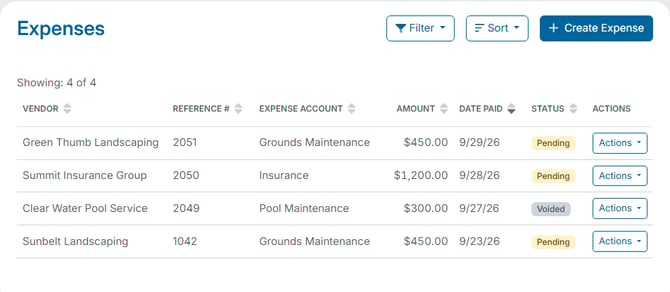
##### Correcting an expense
If you voided an expense because something was wrong, record a new one with the right details using **+ Create Expense** - see "How Do I Record Money the Organization Paid Out?" If only the Payee Name, Check/Reference #, or Notes are wrong, you do not need to void; use "How Do I Edit an Expense?" instead.
- [Empower Knowledge Center](https://help.hoastart.app/empower-knowledge-center?hsLang=en#main-content)
- [Budgets & Expenses](https://help.hoastart.app/empower-knowledge-center?hsLang=en#budgets-expenses)
- [Dashboard & Reporting](https://help.hoastart.app/empower-knowledge-center?hsLang=en#dashboard-reporting)
- [Documents](https://help.hoastart.app/empower-knowledge-center?hsLang=en#documents)
- [Email & Communication](https://help.hoastart.app/empower-knowledge-center?hsLang=en#email-communication)
- [Invoicing & Billing](https://help.hoastart.app/empower-knowledge-center?hsLang=en#invoicing-billing)
- [Members](https://help.hoastart.app/empower-knowledge-center?hsLang=en#members)
- [Organization Settings](https://help.hoastart.app/empower-knowledge-center?hsLang=en#organization-settings)
- [Payments](https://help.hoastart.app/empower-knowledge-center?hsLang=en#payments)
- [Budgets & Expenses](https://help.hoastart.app/budgets-expenses?hsLang=en)
- [Dashboard & Reporting](https://help.hoastart.app/dashboard-reporting?hsLang=en)
- [Documents](https://help.hoastart.app/documents?hsLang=en)
- [Email & Communication](https://help.hoastart.app/email-communication?hsLang=en)
- [Invoicing & Billing](https://help.hoastart.app/invoicing-billing?hsLang=en)
- [Members](https://help.hoastart.app/members?hsLang=en)
- [Organization Settings](https://help.hoastart.app/organization-settings?hsLang=en)
- [Payments](https://help.hoastart.app/payments?hsLang=en)
- [Support](https://help.hoastart.app/support?hsLang=en)
- [Properties](https://help.hoastart.app/properties?hsLang=en)
[](https://hoastart.com/)
Copyright © 2026, HOA Start