
Organization Settings > Activity Logs is a running, read-only history of changes made to the organization's own record — its settings, contacts, addresses, bank connections, and Stripe connection. This is separate from the Document Center's own activity log, which tracks uploaded documents, not organization-level changes. Owners and Org Admins can view the log.
When would you use this?
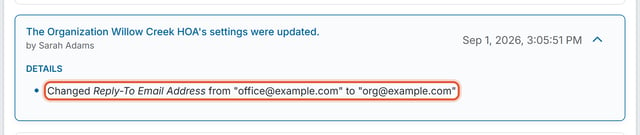
- Confirming who changed the organization's Reply-To Email Address, and when, after members report replies aren't reaching the right inbox.
- Checking who updated the mailing address on file after board mail stops arriving at the expected location.
How to Get There
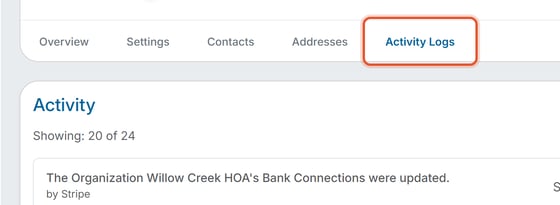
- Click Organization Settings in the left nav.
- Click the Activity Logs tab. Open an entry's arrow to see its Details.
Reading an Entry
Each entry is a plain-language sentence describing what changed (for example, "The Organization's settings were updated," or "The Organization's addresses were updated"), who made the change ("by" followed by the person's name), and a timestamp. Entries that involve field-level changes include a Details section listing exactly what changed — for example, "Changed Reply-To Email Address from 'None' to 'org@example.com'" or "Changed Physical Address - State/Province from 'Arizona' to 'Alberta'." Bank connection changes appear as “The Organization’s Bank Connections were updated,” and when the bank connection service itself made the change, the entry reads “by Stripe.”
Good to Know
- The log covers organization-level changes only — settings, contacts, addresses, bank connections, and Stripe connection. It does not include member-level or property-level activity; those each have their own Activity Logs tab on the member's or property's own profile page.
- The count at the top (for example, "Showing: 20 of 35") shows how many entries are loaded. The log loads 20 entries at a time; scroll to the bottom of the list to load older entries.
Note: This log cannot be edited or cleared — it is a permanent audit trail of the organization record.