
The activity log is a running history of everything done to a connected bank account's transactions in Bank Reconciliation — every match, transfer, exclusion, and undo — newest first. Use it when you need to see who resolved a transaction, when they did it, and why.
How to Get There
- Click Financials in the left nav, then Bank Reconciliation.
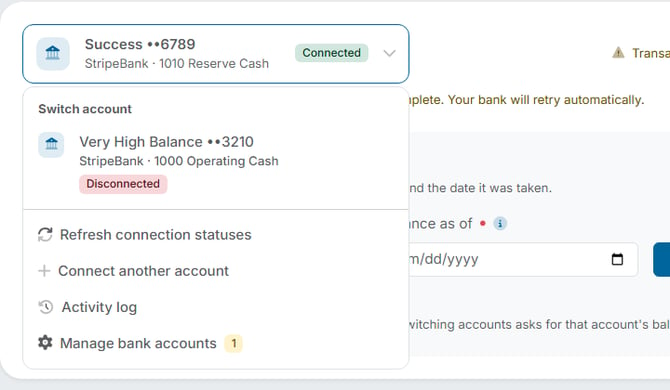
- Click the dropdown arrow on the account card header.
- Choose Activity log.
What You'll See
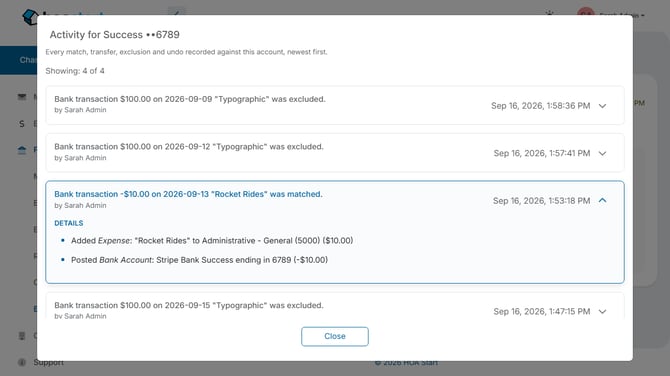
A window opens titled "Activity for" followed by the account's name and last four digits, for example "Activity for Success ••6789." Under the title, a line reads "Showing: 4 of 4" so you know how many entries the account has.
Each entry shows:
- What happened — a plain sentence such as: Bank transaction -$10.00 on 2026-09-13 "Rocket Rides" was matched.
- Who did it — the person's name, shown as "by" followed by their name.
- When — the date and time it was done.
Click the arrow at the right of an entry to open its DETAILS. What appears depends on what was done:
- An exclusion lists the reason that was chosen, for example Excluded Reason: "Predates Records."
- A match lists what it created and posted — for example, Added Expense: "Rocket Rides" to Administrative - General (5000) ($10.00), and Posted Bank Account: Stripe Bank Success ending in 6789 (-$10.00).
Click Close when you're finished.
When This Is Useful
- Your bookkeeper asks why a $100 deposit never showed up in your books. The log shows it was excluded, who excluded it, and the reason given.
- A board member wants to know who matched a $10 payment to an expense. The entry names the person and shows the expense that was created.
Note: The log belongs to one bank account — the account named in the window's title. It is a record to read, not a place to make changes. To reverse something, see "How Do I Undo a Cleared Bank Reconciliation Transaction?"