
See a single member's invoices, payment history, properties, communication history, and activity in one place.
The Member Profile page is a dedicated, single-member view — separate from the org-wide Members list — that brings together everything on file for one person: their invoices, payment history, associated properties, communication history, and account activity, each on its own tab.
When would you use this?
- A member calls asking why they owe money — pull up their profile to see every outstanding invoice tied to them in one place.
- Confirming which properties a member is actually attached to before approving a request that depends on ownership.
- Checking whether a past-due notice or invitation email actually reached a member, using their Communication History.
How to Get There
- Click
Membersin the left nav. - Find the member, open their row's Actions menu, and choose
View. (Clicking the member's name does not open the profile.)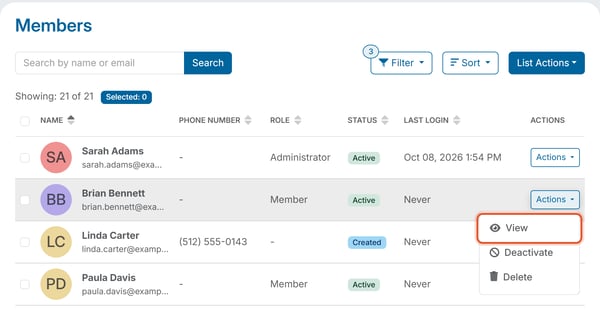
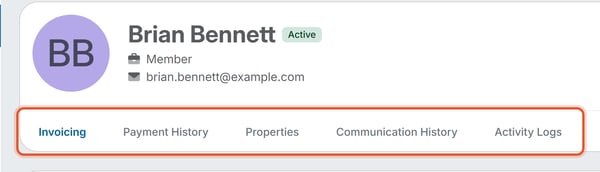
The header repeats the member's name, current Status (for example Active or Created), Role (Member, Administrator, or Owner), and email address, with its own Actions button (Edit Profile is available from here). Below the header is a row of tabs: Invoicing, Payment History, Properties, Communication History, and Activity Logs.
Invoicing tab
An Outstanding Invoices table scoped to this one member, listing Invoice #, Invoice Name, Property, Due date, Status, Amount, and a per-row Actions menu. On a wide screen the table also shows the Issued date and Late Fees. A summary line shows the total Amount Owed, and a Pay button lets you take a payment against the member's balance directly from this tab.
Payment History tab
A table of payments this member has made, covering every property they're attached to, with a Resend Receipts option for re-sending a payment receipt email.
To resend a receipt for one payment, click Actions next to the payment and choose Resend Receipt. For a refunded payment, the Actions menu offers Resend Refund Statement instead.
Properties tab
Lists every property this member is attached to (Address and Title), with a search box and an Attach Property button for connecting the member to another property directly from this tab. It is the member-side equivalent of the Contacts tab on a Property Profile page.
Communication History tab
A record of emails sent to this member — invoice notices, invitation emails, and similar — useful for confirming whether a message actually reached them.
Activity Logs tab
A chronological audit trail of changes to this member's own record — for example, profile edits, invitations, and property assignments — each entry showing who made the change and when.
Good to Know
- Edit Profile (from the Actions button in the header) is how you correct a member's first name, last name, phone number, or email address — the Member Profile page itself is a read-only view of that data plus the linked tabs above.
Note: A member who hasn't yet accepted their invitation shows a Created status instead of Active, and their Invoicing/Payment History tabs may be empty until they're fully onboarded.