
Every Member Profile page has a Communication History tab, alongside Invoicing, Payment History, Properties, and Activity Logs. It's meant to be a running log of every email the platform has sent to that specific member — invitations, invoice reminders, late fee notices, and any email blasts sent to them — so owners and administrators can check whether a particular member actually received something without having to dig through the organization-wide Email History.
When would you use this?
- A member calls in saying they never received an invoice reminder or a late fee notice, and you want to check whether the email was actually sent to them.
- You just sent an invitation to a new member and want to confirm it went out before following up by phone.
- You're troubleshooting why a member seems to be missing emails compared to the rest of the organization.
How to Get There
- Click Members in the left nav.
- Find the member and open their row's Actions menu, then click View.
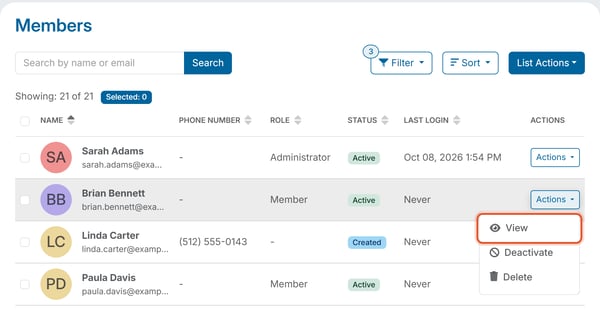
- On the Member Profile page, click the Communication History tab.
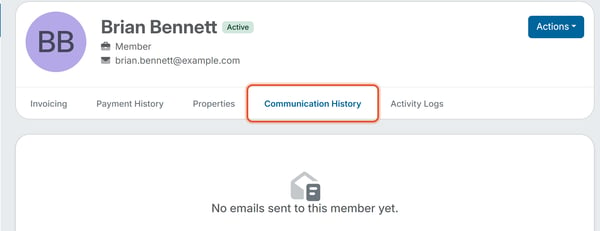
Member Profile page with the Communication History tab selected.
What You'll See
The tab is designed to list each email sent to the member, newest first, along with the email's subject and its latest delivery status (the same status values used on the organization-wide Email History page, such as Sent, Opened, Bounced, or Failed).
If no emails have been sent to that member yet, the tab shows an empty state with the message "No emails sent to this member yet."
Note: If this tab is empty and you need to confirm that a specific email reached a member, check Message Center > Email History and search by the member's email address or by a word from the email's subject.
Note: This tab is read-only — it's a log for reference, not a place to resend or manage emails. To resend something to a member, use Message Center > Send Email instead.