---
title: How Do I Enable Credit Card and ACH Payments
description: Learn how credit card and ACH payments are enabled for members automatically once Stripe onboarding is complete.
---
[Skip to content](https://help.hoastart.app/how-do-i-enable-credit-card-and-ach-payments#main-content)

Open main navigation
Close main navigation
How can we help you?
- There are no suggestions because the search field is empty.
1. [HOA Start - Empower](https://help.hoastart.app/?hsLang=en)
2. [Payments](https://help.hoastart.app/payments?hsLang=en)
# How Do I Enable Credit Card and ACH Payments
Credit card and ACH (bank account) payments are not something you turn on manually. Once an organization completes Stripe Onboarding, both payment methods become available automatically for members to use. There is no "Enable Credit Card Payments" or "Enable ACH Payments" toggle anywhere in Organization Settings, and no "Stripe Customer ID" field.
**How to Confirm It's Enabled**
Click Organization Settings in the left menu, click the Settings tab, then click Stripe Onboarding in the list on the left. If the org shows "Stripe Onboarding Complete," credit card and ACH are already live for members — no further action is needed.

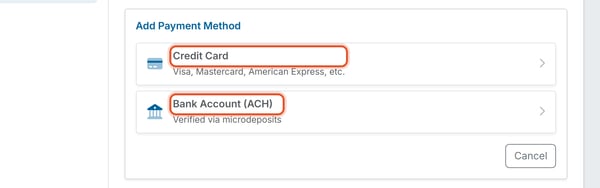
You can also confirm from the member side: open My Profile \> Settings \> Payment Methods \> Add Payment Method. Both "Credit Card (Visa, Mastercard, American Express, etc.)" and "Bank Account (ACH) – Verified via microdeposits" will already appear as options, with no separate setup step required.
**Good to Know**
If a member doesn't see a payment method they expect, the org's Stripe onboarding is most likely still incomplete or was disconnected — check Organization Settings \> Stripe Onboarding rather than looking for a payments toggle that doesn't exist.
- [Dashboard & Reporting](https://help.hoastart.app/dashboard-reporting?hsLang=en)
- [Members](https://help.hoastart.app/members?hsLang=en)
- [Properties](https://help.hoastart.app/properties?hsLang=en)
- [Documents](https://help.hoastart.app/documents?hsLang=en)
- [Email & Communication](https://help.hoastart.app/email-communication?hsLang=en)
- [Budgets & Expenses](https://help.hoastart.app/budgets-expenses?hsLang=en)
- [Invoicing & Billing](https://help.hoastart.app/invoicing-billing?hsLang=en)
- [Payments](https://help.hoastart.app/payments?hsLang=en)
- [Bank Reconciliation](https://help.hoastart.app/bank-reconciliation?hsLang=en)
- [Organization Settings](https://help.hoastart.app/organization-settings?hsLang=en)
- [Support](https://help.hoastart.app/support?hsLang=en)
[](https://hoastart.com/)
Copyright © 2026, HOA Start