---
title: How Do I Edit a Budget?
description: Change the amounts or account rows on an existing budget from Financials > Budgets.
---
[Skip to content](https://help.hoastart.app/how-do-i-edit-a-budget#main-content)

Open main navigation
Close main navigation
How can we help you?
- There are no suggestions because the search field is empty.
1. [HOA Start - Empower](https://help.hoastart.app/?hsLang=en)
2. [Budgets & Expenses](https://help.hoastart.app/budgets-expenses?hsLang=en)
# How Do I Edit a Budget?
This article shows you how to edit a budget you have already created: change the amounts or add and remove account rows. Owners and Org Admins can do this from Financials \> Budgets.
**Before you start:** The Year on a budget cannot be changed. Each year can have only one budget.
##### **Steps**
1. Click **Financials** in the left nav, then click **Budgets**.
2. Click **Actions** on the budget's row.
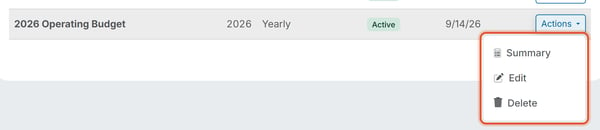
3. Choose **Edit**.
4. Type a new **Annual Budget Amount** for any line. You can also change the **Account**, add a new line with **Add Row**, or remove a line with the trash icon.
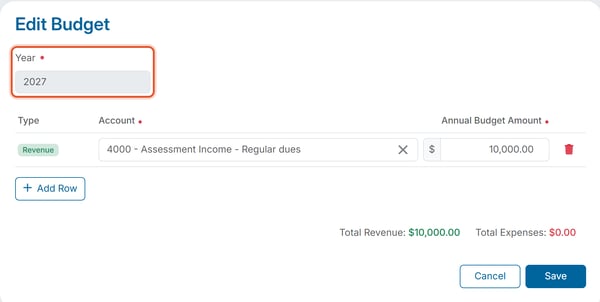
5. Click **Save** to save your changes.
##### **Editing a budget mid-year**
Unlike Expenses, a budget can be edited after you create it: use the row Actions menu, then Edit. You can change the amounts and the account rows, but not the Year. If a planned amount changes partway through the year — for example, the board approves a higher reserve contribution — use **Edit** on the existing budget rather than creating a new budget for the same year. A second budget for the same year can't be created — the Create Budget form shows "A budget already exists for this year."
##### **Related articles**
- [View and Edit Budgets](https://help.hoastart.app/view-and-edit-budgets?hsLang=en)
- [How Do I Delete a Budget?](https://help.hoastart.app/how-do-i-delete-a-budget?hsLang=en)
- [Create a Budget](https://help.hoastart.app/create-a-budget?hsLang=en)
- [Dashboard & Reporting](https://help.hoastart.app/dashboard-reporting?hsLang=en)
- [Members](https://help.hoastart.app/members?hsLang=en)
- [Properties](https://help.hoastart.app/properties?hsLang=en)
- [Documents](https://help.hoastart.app/documents?hsLang=en)
- [Email & Communication](https://help.hoastart.app/email-communication?hsLang=en)
- [Budgets & Expenses](https://help.hoastart.app/budgets-expenses?hsLang=en)
- [Invoicing & Billing](https://help.hoastart.app/invoicing-billing?hsLang=en)
- [Payments](https://help.hoastart.app/payments?hsLang=en)
- [Bank Reconciliation](https://help.hoastart.app/bank-reconciliation?hsLang=en)
- [Organization Settings](https://help.hoastart.app/organization-settings?hsLang=en)
- [Support](https://help.hoastart.app/support?hsLang=en)
[](https://hoastart.com/)
Copyright © 2026, HOA Start