
Every invoice row on the Invoice Dashboard has its own Actions menu. Download Invoice saves a PDF copy of that invoice to your device. It is available for every invoice, including Paid and Voided ones.
When Would You Use This?
- A member asks for a copy of a specific invoice.
- You want a printable or shareable copy of an invoice for your own records.
How to Download an Invoice
- Go to
Balances > Invoice Dashboard. - Find the invoice and click
Actionson its row.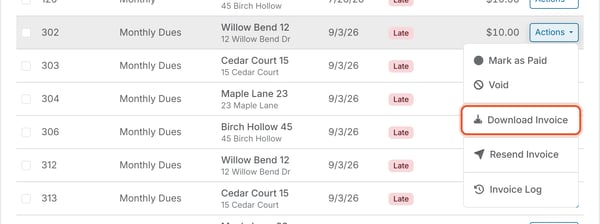
- Click
Download Invoice. - Your browser saves a PDF copy of the invoice.
Good to Know
- The PDF is a copy of that invoice.
- Downloading an invoice does not send anything to the member or change the invoice's status. It only saves a copy to your own device.