---
title: How Do I Cancel a Pending ACH Payment?
description: Cancel a pending bank (ACH) payment from the Payment Dashboard or a Payment History tab so the invoice returns to Open or Late.
---
[Skip to content](https://help.hoastart.app/how-do-i-cancel-a-pending-ach-payment#main-content)

Open main navigation
Close main navigation
How can we help you?
- There are no suggestions because the search field is empty.
1. [HOA Start - Empower](https://help.hoastart.app/?hsLang=en)
2. [Payments](https://help.hoastart.app/payments?hsLang=en)
# How Do I Cancel a Pending ACH Payment?
This article shows you how to cancel a bank (ACH) payment that is still Pending so the invoice goes back to Open or Late. Owners and Org Admins can do this from the Payment Dashboard, from a property's Payment History tab, or from a member's Payment History tab.
**Before you start:** The Cancel Payment action appears only on a payment whose Status is Pending. Payments that show Succeeded, Marked, Canceled, Unmarked, or Failed do not offer it. A canceled payment cannot be reinstated; to collect the money, pay the invoice again.
##### **When would you use this?**
- A member paid an invoice from the wrong bank account and the payment is still Pending.
- A payment was submitted for the wrong invoice or the wrong property, and you want the invoice open again before it clears.
- A member tells you they want to pay another way, such as a mailed check, and the bank payment has not finished processing.
##### **Steps**
1. Click Balances in the left nav, then click Payment Dashboard. You can also open a property's profile or a member's profile and click its Payment History tab; the Actions menu there works the same way.
2. Find the Pending payment. Type an Invoice Name, Invoice #, or Property in the Search Payments box and click Search, or look for the yellow Pending badge in the Status column. The Pending Payments tile at the top shows how many payments are Pending.
3. Click Actions at the end of the payment's row, then click Cancel Payment.
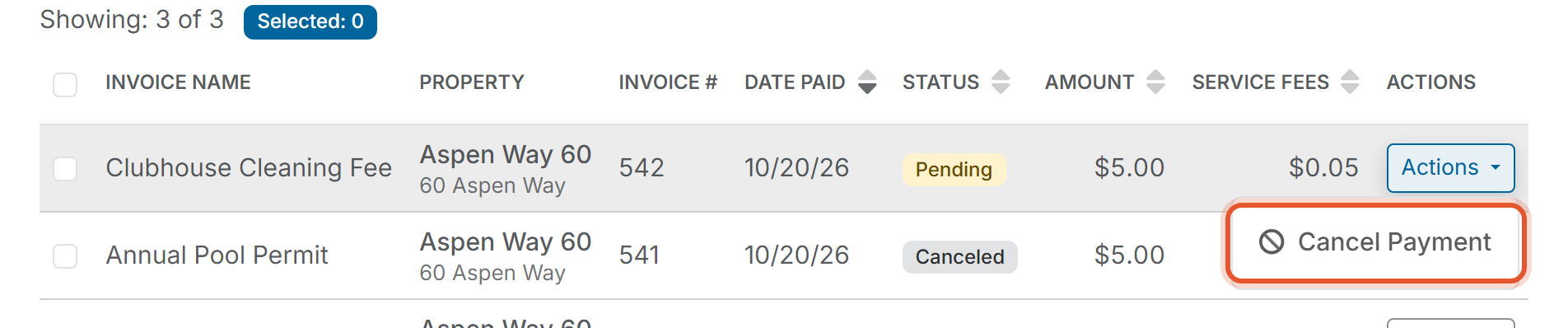
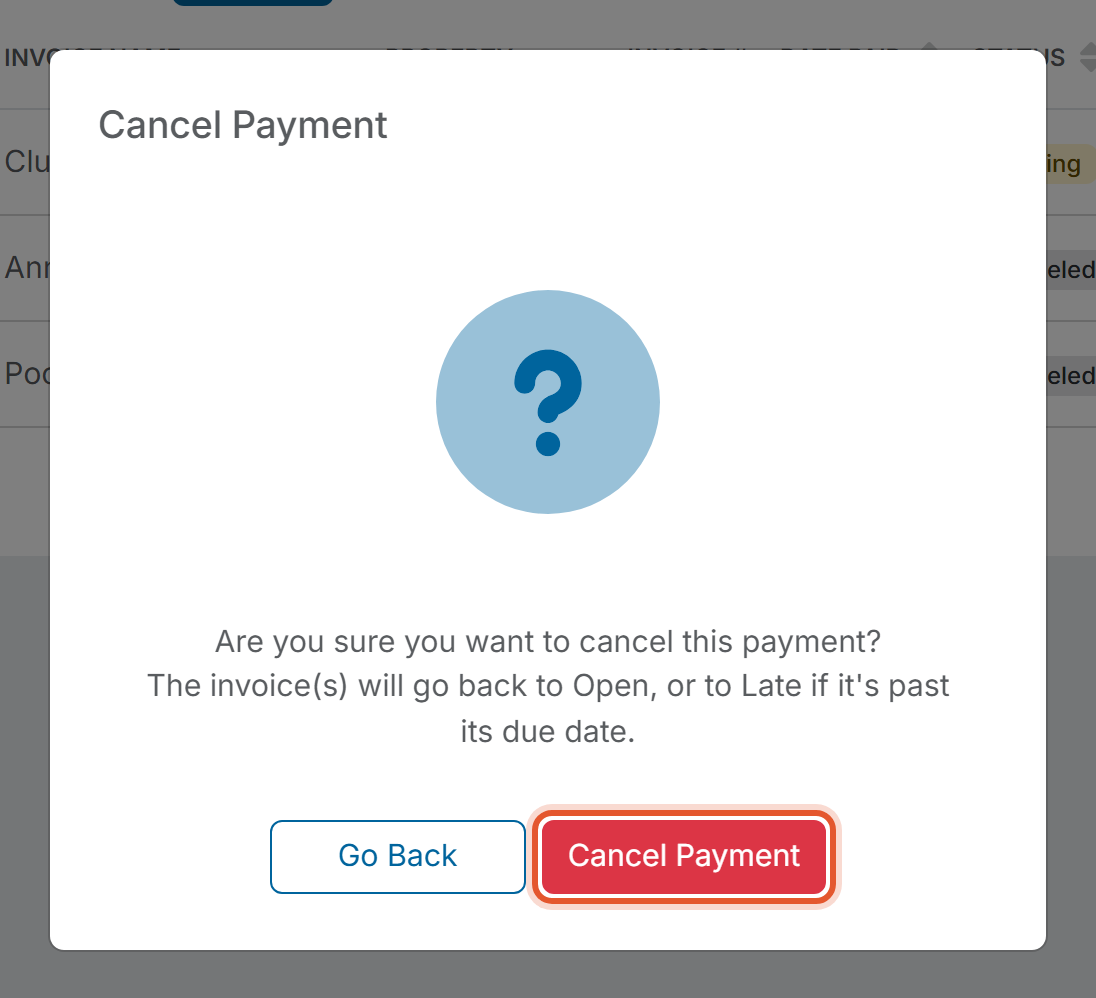
4. Read the Cancel Payment window. It asks "Are you sure you want to cancel this payment?" and explains that the invoice(s) will go back to Open, or to Late if it is past its due date. Click Cancel Payment to continue, or click Go Back to leave the payment as it is.
5. When the message "Payment cancelation was requested successfully. The payment will show as Canceled once the cancelation is confirmed." appears, click OK.
6. Check the Status column. The payment shows Canceling while the request is processed, and its Actions button is grayed out. After the cancelation is confirmed, which usually takes a few seconds, the Status changes to Canceled. Refresh the page if you still see Canceling.

##### **Good to Know**
- After the payment shows Canceled, the invoice's Status returns to Open, or to Late if the due date has passed, and the Pay button is available for that invoice again.
- The canceled payment stays in the Payment Dashboard with the Canceled status, so you keep a record of it. It no longer counts toward the Pending Payments tile.
- If Cancel Payment is missing from the Actions menu, the payment is no longer Pending, so it cannot be canceled.
- Email History includes Payment Canceled and Payment Canceled (Multiple Invoices) in its Email Type filter. See [What Are the Automated Email Types?](https://help.hoastart.app/what-are-the-automated-email-types?hsLang=en)
***Note:*** ACH payments typically take 3-5 business days to complete, and the payment shows Pending until it completes.
##### **Related articles**
- [View the Payment Dashboard](https://help.hoastart.app/view-payment-history?hsLang=en)
- [Understand Payment Status Values](https://help.hoastart.app/understand-payment-status-values?hsLang=en)
- [How Do I Pay an Invoice for a Member or Property?](https://help.hoastart.app/how-do-i-pay-an-invoice-for-a-member-or-property?hsLang=en)
- [What Do the Invoice Status Values Mean](https://help.hoastart.app/what-do-the-invoice-status-values-mean?hsLang=en)
- [Filter and Search the Payment Dashboard](https://help.hoastart.app/filter-and-search-payment-history?hsLang=en)
- [Dashboard & Reporting](https://help.hoastart.app/dashboard-reporting?hsLang=en)
- [Members](https://help.hoastart.app/members?hsLang=en)
- [Properties](https://help.hoastart.app/properties?hsLang=en)
- [Documents](https://help.hoastart.app/documents?hsLang=en)
- [Email & Communication](https://help.hoastart.app/email-communication?hsLang=en)
- [Budgets & Expenses](https://help.hoastart.app/budgets-expenses?hsLang=en)
- [Invoicing & Billing](https://help.hoastart.app/invoicing-billing?hsLang=en)
- [Payments](https://help.hoastart.app/payments?hsLang=en)
- [Bank Reconciliation](https://help.hoastart.app/bank-reconciliation?hsLang=en)
- [Organization Settings](https://help.hoastart.app/organization-settings?hsLang=en)
- [Support](https://help.hoastart.app/support?hsLang=en)
[](https://hoastart.com/)
Copyright © 2026, HOA Start