---
title: How Do I Attach a File to an Email?
description: Attach a file from the Document Center or upload one from your device to an email in Message Center.
---
[Skip to content](https://help.hoastart.app/how-do-i-attach-a-file-to-an-email#main-content)

Open main navigation
Close main navigation
How can we help you?
- There are no suggestions because the search field is empty.
1. [HOA Start - Empower](https://help.hoastart.app/?hsLang=en)
2. [Email & Communication](https://help.hoastart.app/email-communication?hsLang=en)
# How Do I Attach a File to an Email?
##### This article shows you how to attach a file to an email in Message Center \> Send Email, either by picking a file already stored in the organization's Document Center or by uploading a new file from your computer. Owners and Org Admins can do this.
**Attach a file from the Document Center**
1. Go to Message Center \> Send Email.
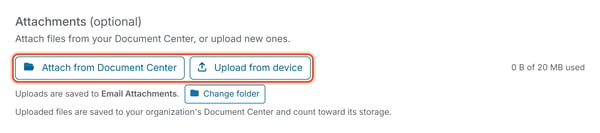
2. Under Attachments (optional), click Attach from Document Center to open the Attach a file from Document Center window.
3. Click a folder to see its files.
4. Click a file to select it.
5. Click Attach to add this file to your email.
***Note:*** The file stays in Document Center. This only adds a copy to the email.
##### **Upload a file from your device**
1. Go to Message Center \> Send Email and scroll to the Attachments section below your message.
2. Click Upload from device to open your computer's file picker and choose a file to attach.
##### **Good to Know**
- A running total (e.g. "0 B of 20 MB used") shows how much of the attachment size limit you've used.
- Files you upload through Upload from device are saved into the organization's Document Center, in the folder shown next to "Uploads are saved to" (an Email Attachments folder by default; use Change folder to pick a different one), and count toward that organization's document storage.
- Attaching a PDF of a newsletter or a signed board resolution lets recipients receive the document along with the message.
##### **Related articles**
- [Send an Email to Members or Properties](https://help.hoastart.app/send-an-email-to-members-or-properties?hsLang=en)
- [How Do I Choose Recipients for an Email?](https://help.hoastart.app/how-do-i-choose-recipients-for-an-email?hsLang=en)
- [How Do I Upload Files to Document Center](https://help.hoastart.app/how-do-i-upload-files-to-document-center?hsLang=en)
- [What Are the Maximum File Size and File Type Limits in Document Center](https://help.hoastart.app/what-are-the-maximum-file-size-and-file-type-limits-in-document-center?hsLang=en)
- [Dashboard & Reporting](https://help.hoastart.app/dashboard-reporting?hsLang=en)
- [Members](https://help.hoastart.app/members?hsLang=en)
- [Properties](https://help.hoastart.app/properties?hsLang=en)
- [Documents](https://help.hoastart.app/documents?hsLang=en)
- [Email & Communication](https://help.hoastart.app/email-communication?hsLang=en)
- [Budgets & Expenses](https://help.hoastart.app/budgets-expenses?hsLang=en)
- [Invoicing & Billing](https://help.hoastart.app/invoicing-billing?hsLang=en)
- [Payments](https://help.hoastart.app/payments?hsLang=en)
- [Bank Reconciliation](https://help.hoastart.app/bank-reconciliation?hsLang=en)
- [Organization Settings](https://help.hoastart.app/organization-settings?hsLang=en)
- [Support](https://help.hoastart.app/support?hsLang=en)
[](https://hoastart.com/)
Copyright © 2026, HOA Start