---
title: How Do I Add or Edit an Organization Address
description: add or edit an organization
---
[Skip to content](https://help.hoastart.app/how-do-i-add-or-edit-an-organization-address#main-content)

Open main navigation
Close main navigation
How can we help you?
- There are no suggestions because the search field is empty.
1. [HOA Start - Empower](https://help.hoastart.app/?hsLang=en)
2. [Organization Settings](https://help.hoastart.app/organization-settings?hsLang=en)
# How Do I Add or Edit an Organization Address
Organization Settings \> Addresses stores the organization's physical, mailing, and billing addresses on file with HOA Start. Changes to addresses are recorded in the Activity Logs tab. See "[How Do I View the Organization Activity Log](https://help.hoastart.app/how-do-i-view-the-organization-activity-log?hsLang=en)"
##### **When would you use this?**
- Recording the HOA's physical property location, separate from where mail should be sent.
- The board rents a P.O. box for general mail and notices, different from the physical property address.
- Invoices and billing correspondence should go to a management company's address instead of the property itself.
##### **Steps**
1. Click Organization Settings in the left nav.
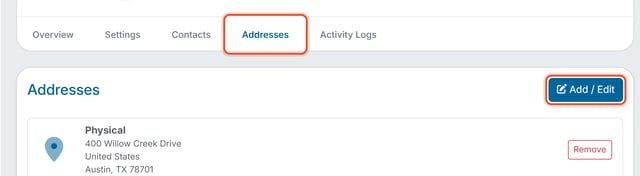
2. Click the Addresses tab.
3. Click Add / Edit.
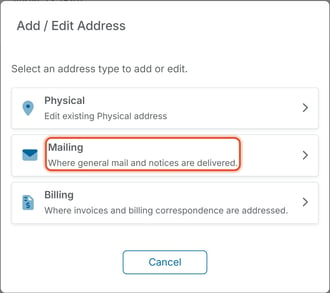
4. Select an address type: Physical, Mailing ("Where general mail and notices are delivered.") or Billing ("Where invoices and billing correspondence are addressed."). If an address of that type is already on file, its row reads "Edit existing" with the type name, such as "Edit existing Physical address", and opens it for editing; if not, a blank Add form opens.
5. Choose a Country, then fill in Address Line 1, Address Line 2 (optional, for a suite or unit number), City, State / Province and Zip / Postal Code. Fields marked with a red dot are required.
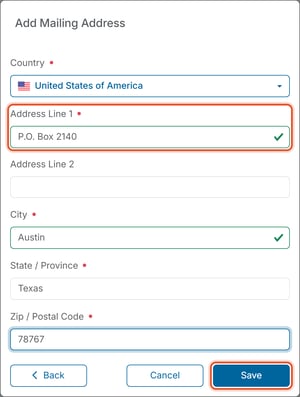
6. Click Save.
- [Dashboard & Reporting](https://help.hoastart.app/dashboard-reporting?hsLang=en)
- [Members](https://help.hoastart.app/members?hsLang=en)
- [Properties](https://help.hoastart.app/properties?hsLang=en)
- [Documents](https://help.hoastart.app/documents?hsLang=en)
- [Email & Communication](https://help.hoastart.app/email-communication?hsLang=en)
- [Budgets & Expenses](https://help.hoastart.app/budgets-expenses?hsLang=en)
- [Invoicing & Billing](https://help.hoastart.app/invoicing-billing?hsLang=en)
- [Payments](https://help.hoastart.app/payments?hsLang=en)
- [Bank Reconciliation](https://help.hoastart.app/bank-reconciliation?hsLang=en)
- [Organization Settings](https://help.hoastart.app/organization-settings?hsLang=en)
- [Support](https://help.hoastart.app/support?hsLang=en)
[](https://hoastart.com/)
Copyright © 2026, HOA Start