
Every user — Member, Org Admin, or Owner — has their own Payment Methods list on their personal User Profile. This is separate from the organization's own Stripe connection (see "How Do I Connect an Organization to Stripe?"): the organization's Stripe connection is what lets the HOA accept payments from members, while this personal Payment Methods list stores a card or bank account on your own individual account, the same way you might save a card on any online account.
When Would You Use This?
- A member wants to save their card or bank account on file once, instead of re-entering payment details every time they pay an invoice.
- An Owner or Org Admin wants a payment method ready on their own profile before they need to pay something themselves (for example, an invoice on their own property).
How to Get There
- Click your name in the top-right corner of any page.
- Click
My Profile.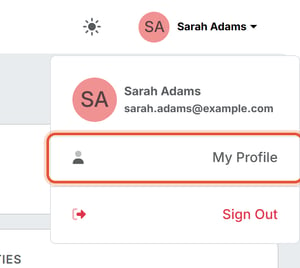
- Click the
Settingstab. - Click
Payment Methodsin the left-hand sub-navigation if it is not already open. The Payment Methods section opens by default.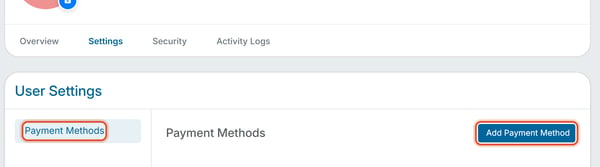
If you haven't added anything yet, the page shows "No payment methods on file."
Adding a Payment Method
- Click
Add Payment Method. - Choose a method type: Credit Card (Visa, Mastercard, American Express, etc.) or Bank Account (ACH) (verified via microdeposits).
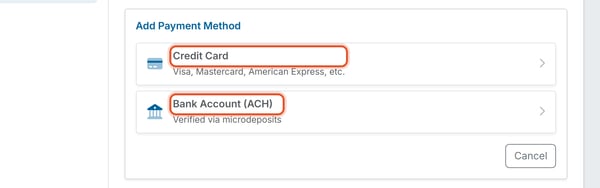
- For a credit card, enter the card details and click Save Payment Method. For a bank account, enter the Account Holder Name, Email, Routing Number, Account Number, and Account Type (Individual or Company), then click Add Bank Account. Click Cancel to leave without adding a payment method.
Good to Know
- Bank Account (ACH) methods are verified via microdeposits — after you add one, expect a short delay before it's usable while the bank account ownership is confirmed.
- This is a personal list tied to your own login, not the organization's. Adding a payment method here does not connect the organization to Stripe and does not change how the HOA accepts payments from other members.
Note: Bank Account (ACH) methods require microdeposit verification before they can be used; Credit Card methods are typically usable immediately after saving.